Why Does Telegram Video Quality Get Worse? Original Files, Compression, and Clarity Explained
Why Does Telegram Video Quality Get Worse? Original Files, Compression, and Clarity Explained
Telegram videos becoming blurry usually does not mean 'the download button crushed the quality'; rather, the video has already changed during sending, channel transcoding, or playback tier selection. To keep a verifiable master, have the sender send it using File, and compare file size, video parameters, and SHA-256 against the source file; any details already lost cannot be restored losslessly by any download tool.

The cover uses a master, compression branches, and download paths to show quality changes; it is an unbranded conceptual illustration, not the real interface of Telegram, Chrome, or an extension.
First, the conclusion: identify which stage degraded the quality
'Original quality,' 'HD,' and 'highest quality' are often used interchangeably, but they are not the same thing. Telegram officially states that newly uploaded videos in large channels may be optimized into multiple quality tiers; the player automatically selects based on network conditions and also allows manual selection of High, Medium, or Low. Even if the picture is still 1080p, it may already have been re-encoded; the same resolution does not mean the bitrate, color information, audio track, or file bytes are the same as before upload.
| Stage | Possible change | Can the download side restore it? | Most reliable handling |
|---|---|---|---|
| Sender sends as a regular video | Client processes video at the chosen compression level | Cannot restore deleted details | When a master is needed, send using File instead |
| Video is posted to a large channel | Telegram generates multiple playback quality versions | Can only choose existing tiers, cannot rebuild pre-upload file | Choose the highest tier during playback; for exact archiving, still request a file version from the publisher |
| Player automatically selects tier by network | Current picture may be Low or Medium | Can switch to a higher tier offered by the page | Open the player quality menu, select High, and observe again |
| Browser or extension saves media | A successful download only proves you got a saveable file | Cannot prove it is the master | Compare size, parameters, and SHA-256; do not conclude from filename |
| Local player scaling or hardware decoding | Viewing effect may change, but the file itself may not | Can switch player or recheck at 100% scale | Check file parameters first, then judge whether it was actually re-encoded |
If you are only saving the current media from an authorized Telegram Web page, you can first check the target extension from Telegram Video Downloader extension installation page. The Chrome Web Store currently describes media download and batch download, and does not promise to restore compressed videos to the uploaded master; therefore 'download complete' cannot replace file integrity verification.
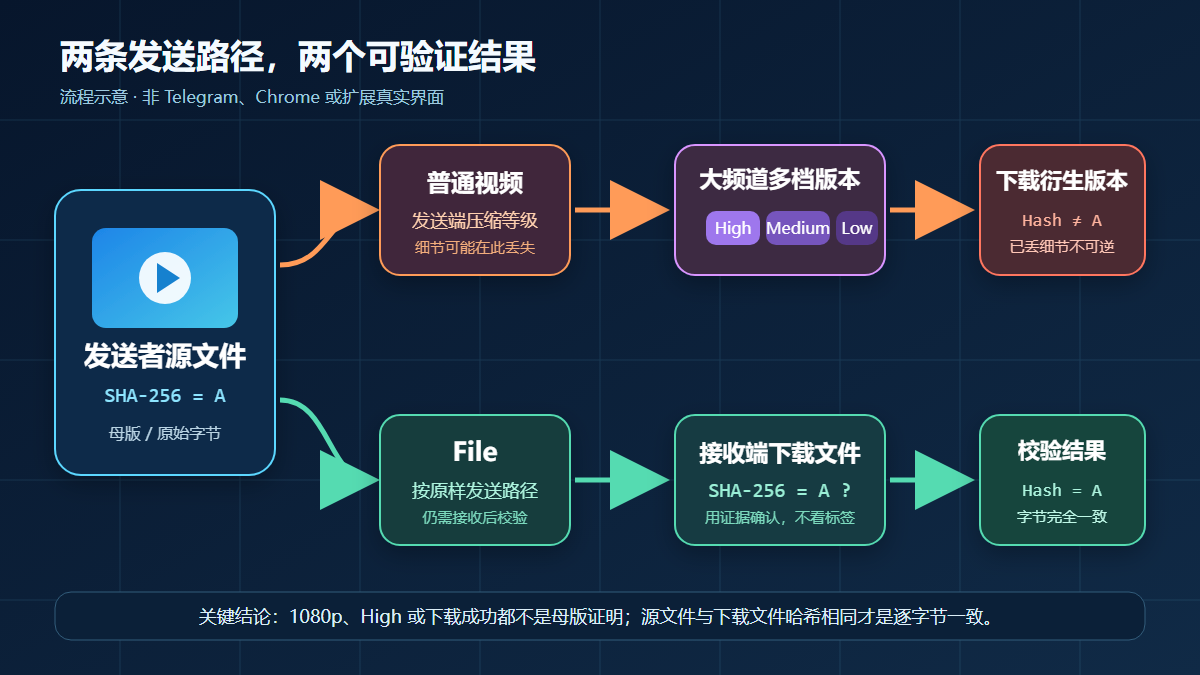
The above is a flow diagram based on Telegram official statements, not the real interface of Telegram or an extension.
Verification environment and scope of evidence for this article
The following information was re-verified on August 28, 2026; versions are only used to describe the writing-day environment and do not mean they will remain unchanged forever:
| Item | Result of this verification |
|---|---|
| System | Windows 11 Pro, version 10.0.26200 |
| Browser | Google Chrome 151.0.7922.174 |
| Telegram Web | Web K 2.2 (673); Web A 12.0.42 |
| Target extension | Chrome Web Store ID gnkkimhkpmldcibibpdhegbjcgdpiakc, version 2.2.5.8, store shows update on June 9, 2026 |
| On-site pages | Extension page, Telegram tool page, and published internal links used in this article all returned HTTP 200 |
This time we did not log into private accounts, download private or protected content, or use unknown masters to test image quality, speed, success rate, or large-file limits. Conclusions about compression paths come from Telegram official announcements and the official issue platform; regarding the extension, only the current store listing and accessible product pages are cited, and product marketing is not presented as independent test conclusions.
What is the difference between original file, full resolution, and highest playback quality
| Term | More accurate meaning | Can it prove it is the uploaded master? |
|---|---|---|
| Original file | A file byte-for-byte identical to the sender's local source file | Yes, but both sides' SHA-256 must be identical |
| Full resolution | Width and height pixels may match upload resolution | No; after re-encoding, identical width and height may still remain |
| Highest playback quality | The highest tier currently offered by the player | No; it is only the highest of existing derivative versions |
| Same file size | Two files occupy similar or identical bytes | No; still need to compare hash and stream parameters |
| Filename contains HD, 1080p, or Original | A name or interface label | No; a label is not integrity evidence |
The strictest single test for 'is it original quality' is: the sender's source file and the downloaded file have exactly the same SHA-256. A different hash only means the file bytes differ, not necessarily that it will look worse to the eye; you should also continue comparing resolution, bitrate, duration, frame rate, codec, audio track, and metadata.
Why Telegram videos become blurry
1. When sent as a regular video, compression may already happen on the sending side
Telegram already offered the ability to choose video compression level before sending in earlier official updates. The official issue platform also explicitly recommends using the File option when sending 'as-is.' This means the file the recipient later saves can at most be faithful to the version existing in Telegram; it cannot reconstruct details already discarded before the sender uploaded.
If you are the sender and need a review master, asset delivery, or long-term archive, do not treat moving the compression slider to the highest as lossless. Choosing the highest quality can reduce obvious loss, but it cannot replace File mode and hash verification.
2. Large channels may have High, Medium, and Low multi-tier versions
Telegram's official 2024 announcement states that videos newly uploaded to large channels are optimized and compressed into multiple quality versions. The player can automatically select a tier based on connection conditions; on a weak network it may first show a more compressed version, while a high-speed connection can watch full resolution.
Here, 'full resolution' still does not equal 'uploaded master unchanged byte-for-byte.' Resolution describes pixel width and height; re-encoding describes how video data is stored; the two cannot substitute for each other. If the player for a channel message has no quality menu, you cannot infer that the current file is definitely uncompressed, because the applicable channels and clients for this feature change.
3. Android external share path has had a 'Send as file' failure issue
Telegram's official issue platform currently records an Android scenario: when entering Telegram from the system gallery or file manager via 'Share' and then choosing Send as file, the file may still be sent as compressed media. The workaround given on the official page is to return to the Telegram app, tap the paperclip, and select the file from the File entry.
This is an issue record for a specific platform and a specific operation path; it should not be expanded into 'all Android devices compress.' What matters is reproducing the path: send from the file entry inside the Telegram app, then compare the hash of the received file and the source file.
4. Playback looking blurry does not necessarily mean the downloaded file was rewritten
Network adaptation, player scaling, display scaling, and hardware decoding can all affect the viewing experience. Separate the problem first: when the player picture is blurry, switch to the highest quality; after downloading, read the file resolution and bitrate; only then judge whether the file is different. Do not conclude that 'the download was compressed again' based only on the thumbnail in the chat window, the first frame, or the full-screen zoom effect.
Reproducible check: determine whether the download is the master or a derivative
- Obtain a lawful sample. Only use videos you uploaded yourself, that are publicly saveable, or for which you have obtained permission from the rights holder. It is best to keep the sender's local source file.
- Record the sending method. Have the sender confirm whether it is a regular video or
File; do not guess based only on the message bubble appearance. - Select the highest playback tier. If the large-channel player shows a quality menu, select High first, then wait for the video to load normally.
- Download only one sample. You can use Telegram's built-in save entry; if you need a Chrome extension, first verify the extension ID and current version, then download the same authorized message. For the basic process, see Tutorial for single and batch downloads in Telegram Web.
- Compare file size and video parameters. Check width, height, duration, frame rate, video bitrate, codec, and audio track. If
ffprobeis installed, run:
ffprobe -v error -select_streams v:0 -show_entries stream=codec_name,width,height,r_frame_rate,bit_rate -show_entries format=duration,size,bit_rate -of json "downloaded.mp4"
- Compare SHA-256. In Windows PowerShell, run respectively:
Get-FileHash -Algorithm SHA256 "source.mp4"
Get-FileHash -Algorithm SHA256 "downloaded.mp4"
- Interpret based on evidence. Identical hash proves the files are byte-for-byte identical; different hash but similar parameters only means they are not the same file; obviously lower resolution or bitrate means you got a lower-tier or re-encoded version. Without the source file, only describe 'the highest version currently obtainable'; do not claim 'original file.'
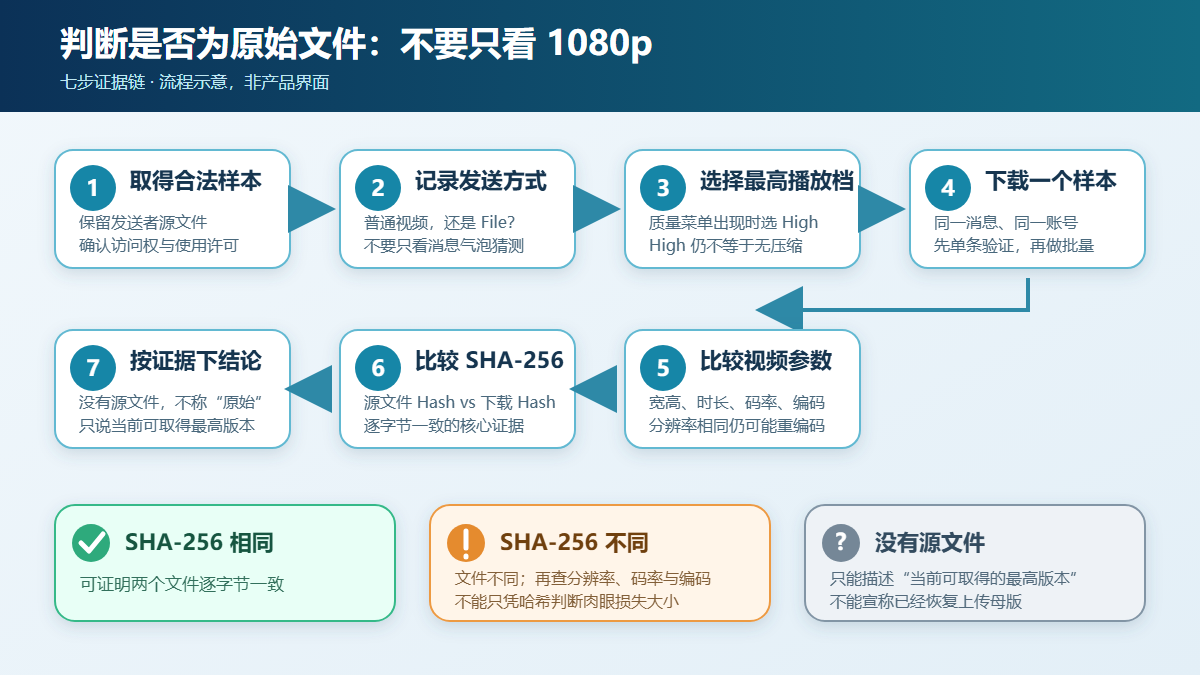
This check flow uses evidence to eliminate issues layer by layer; it is an explanatory diagram, not the real interface of Telegram, Chrome, or an extension.
How to preserve original quality as much as possible on the sending side
Need byte-for-byte consistency: send using File
- Open the target chat or channel in the Telegram app.
- Tap the paperclip or attachment button, and select the video from
File, a file manager, or an equivalent entry; wording may differ slightly across clients. - Before sending, confirm you have not entered a regular video cropping, filter, or compression flow.
- After the recipient downloads, compare SHA-256; for important deliveries, also keep records of filename, size, and sending time.
If entering Telegram from the Android system 'Share' menu fails to keep file mode, switch to the in-app paperclip and File entry. For work assets, verify with a small sample first, then send the whole batch.
Need direct preview in chat: accept the trade-off of possible re-encoding
Regular videos are more convenient for direct playback in chat, but client-side compression may occur; large channels may also generate multiple playback versions. Choosing the highest compression level offered by the client before sending can improve the result, but cannot promise it will be identical to the source file. Telegram officially does not provide a set of universal encoding parameters that guarantee large channels will never re-encode; when an exact master is needed, File mode remains a verifiable path.
How the download side can avoid mistaking 'highest tier' for 'original quality'
- Confirm upstream first. Ask the sender whether they sent with
Fileand whether they kept the source file; this is the most irreplaceable information for the download side. - Select the highest playback tier before saving. Choose High when the quality menu exists; when the menu does not exist, do not guess the current tier.
- Verify the extension with a single sample. Enter the store from the confirmed Extension installation page, verify the ID, and then operate. The extension page being able to download media does not mean it can prove the media is the master.
- Keep evidence. Record the message link, download date, file size, parameters, and SHA-256. For batch tasks, spot-check first, then expand to the whole batch.
- Do not use 'repair' to cover up facts. AI upscaling, sharpening, or noise reduction can change the viewing effect, but cannot restore real pixels deleted by lossy compression, nor can it call generated results the original file.
If the button is missing, the download is interrupted, or the file cannot be found, first handle browser and page issues according to Troubleshooting Telegram video download failures; if the goal is auditable long-term archiving, compare with Comparison of download extension and Telegram Desktop export to choose a more suitable tool.
Limits, privacy, copyright, and lawful use boundaries
- Download tools do not increase account permissions. Content you cannot normally join, view, or save should not be obtained by bypassing access controls.
- Telegram content licensing terms require platform content to be used only for normal, lawful, and intended purposes, and to comply with rights holders' restrictions on copyright and scope of use.
- Private chats, paid content, courses, client assets, and unpublished work files may involve copyright, trade secrets, and personal privacy at the same time; obtain explicit authorization before saving, sharing, or republishing.
- A file hash can prove whether two files are identical, but cannot prove you have distribution rights, nor that the content is authentic, free of malicious code, or suitable for republication.
- This article did not verify restricted content, file size, formats, quotas, speed, ratings, user numbers, or privacy promises in extension marketing; such volatile information should be checked again in the store and product terms on the day of installation and payment.
Frequently Asked Questions
Can a Telegram download extension restore a compressed video?
No. Download tools can only obtain the media version currently provided by Telegram or accessible on the page; details already lost during upload or transcoding cannot be losslessly rebuilt. When a master is needed, contact the sender to request the source file sent using File, and compare the hash.
Does downloading at 1080p mean original quality?
No. 1080p only describes resolution; the video may still use a lower bitrate, different codec, different color information, or different audio track. Only comparing the SHA-256 of the source file and the downloaded file can prove byte-for-byte identity.
Does the player's High equal no compression?
No. High is a higher quality tier offered by the current player; Telegram officially also states that large-channel videos generate multiple compressed versions. 'Full resolution' alone cannot prove the file was not re-encoded.
Does sending as File always preserve the original file?
Officially, the File option is the path for 'send as-is,' but you should still actually verify. Android external share has a record of file mode failing; when this happens, enter File from the in-app paperclip in Telegram, and compare SHA-256 after receiving.
Why does it look clear on the phone but blurry on the computer?
First check whether the two clients selected different playback qualities, then compare the resolution, bitrate, and size of the actual downloaded files. Display scaling, player, and network tier selection can all cause differences in perception; do not judge that the file was rewritten based only on how it looks on screen.
If only a compressed version exists, can it be restored to true original quality?
It cannot be precisely restored. Sharpening, super-resolution, or AI upscaling can only generate new estimated details and will not restore original data that has already been lost. The reliable approach is to request the source file from the sender, channel admin, or content owner.
Sources and update time
This article was updated on August 28, 2026 (Asia/Shanghai); all cited pages were revisited on the writing day:
- Telegram official: dynamic video quality and multi-tier compression for large channels
- Telegram official issue platform: large channel re-encoding and sending as-is using File
- Telegram official issue platform: Android external share Send as file issue and workaround
- Telegram official: choose compression level before sending a video
- Telegram official app list: Web K and Web A
- Telegram content licensing terms
- Chrome Web Store: target Telegram Video Downloader extension
- DownloadVideos365: Telegram Video Downloader extension page
- DownloadVideos365: Telegram online tool